 CHOOSELY

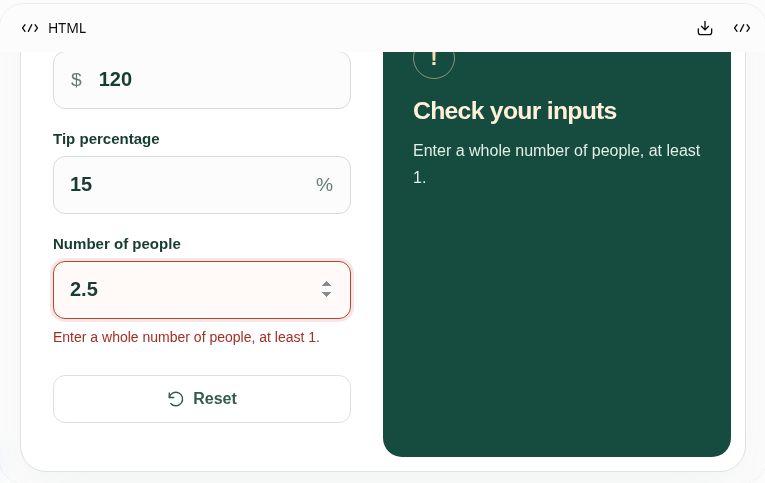
Four people split a $120 dinner and leave a 15% tip. Given the same prompt, ChatGPT and Claude each built a calculator that showed $34.50 per person. When we changed the party size to 2.5, both cleared the dollar amounts and told us how to fix the entry.
Neither preview is an App Store or Google Play upload. ChatGPT gave us a working calculator right in the conversation. Claude gave us an artifact, a tool built in the chat, that opened with one click. Either gives you something people can try before you spend money. Selling it as a phone app takes a mobile build, testing, a developer account, and store review. That’s where you may want a developer’s help. Choosely’s ChatGPT profile · Choosely’s Claude profile
What does it take to sell the app?
You can carry the design and arithmetic into a mobile version. A developer or coding agent can help you build for iPhone and Android, either separately or with tools that share code across both. You’ll need to test the result on the phones you intend to support and sign the build with credentials that identify you as its publisher. Each store has its own route from there. Apple’s submission workflow · Google Play’s app setup guide
For Apple’s App Store, standard Apple Developer Program membership costs US$99 a year, or the local equivalent where available. You create an app record in App Store Connect, upload the signed iOS build, and submit it for review. Before paying someone to package a web calculator, read guideline 4.2. Apple looks for features, content, and an interface that take an app beyond a repackaged website. Putting the same calculator page inside an app window risks rejection. Membership costs · App Store Connect workflow · Guideline 4.2
For Google Play, registration costs US$25 once. You prepare a signed Android App Bundle, the package Play uses to distribute your app, complete the listing and policy declarations, and submit the release for review. New personal accounts must verify access to a physical Android device running Android 10 or later through the Play Console mobile app. The device must qualify under Google’s security requirements, which exclude rooted devices. Personal accounts created after November 13, 2023 also need a closed test. At least 12 testers must stay opted in continuously for 14 days before you can apply for public release. Registration · App setup · Device verification · Testing requirements
Yes, you can charge. A paid download asks people to buy before installing. A free download can offer a paid digital upgrade or subscription. On Apple, the account holder must accept the Paid Apps Agreement to sell downloads or offer in-app purchases. Apple generally requires its purchase system for digital features sold inside an app. Google Play requires its billing system for paid downloads and generally for digital purchases inside Play-distributed apps. Regional exceptions and alternative payment programs have their own terms. Check the rules and fees where you intend to sell, and budget for fixes and updates after launch. Apple’s paid agreements · Apple’s payment rules · Google Play’s payments policy
What did one prompt actually build?
The brief asked for Dinner Split. Enter the bill, tip percentage, and number of people. See the tip, total, and each diner’s share update as you type. The calculator had to reject impossible entries, include a reset button, and be usable on a phone.
ChatGPT returned a single HTML file and displayed the working calculator inline. In Claude, clicking View Dinner split opened the artifact with its preview already selected. Both were ready to try after the first prompt.
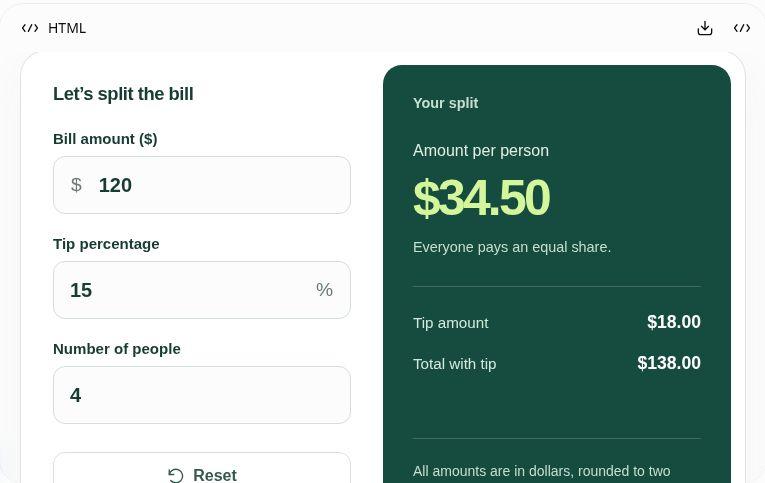
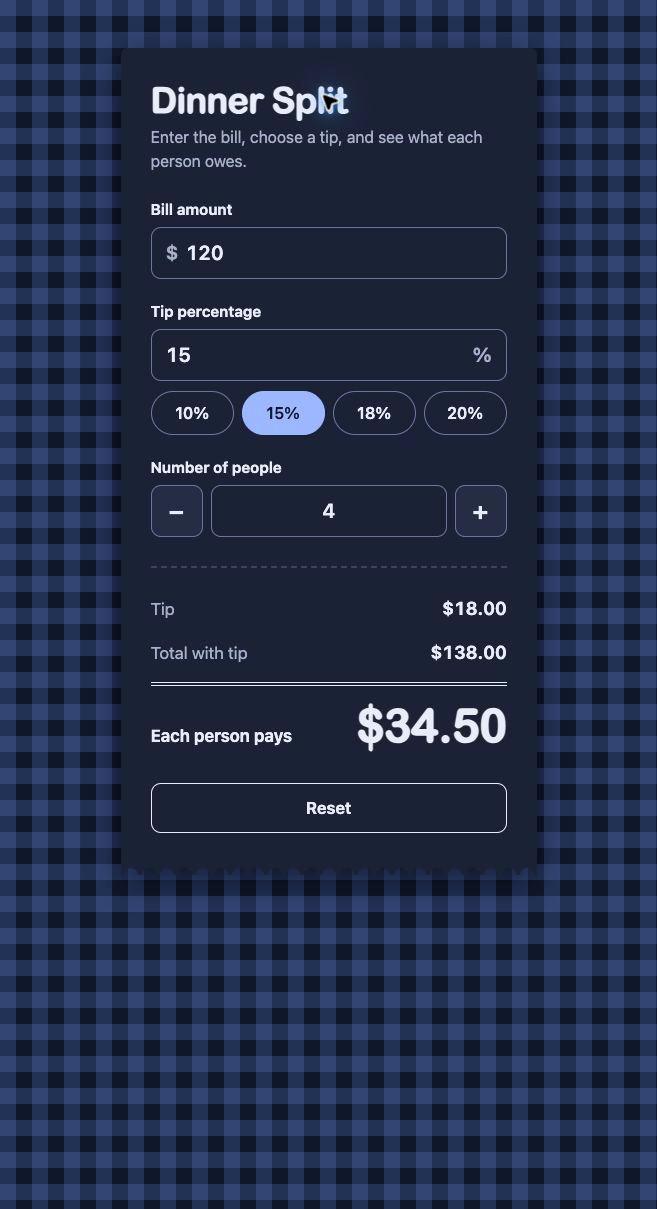
| What we tried | What happened |
|---|---|
| Split $100 three ways with no tip | Both displayed $33.33 each, correctly rounded to two decimal places. The brief didn’t ask either app to assign the leftover cent to one diner. |
| Enter 2.5, 0, or −2 people | Both hid the amounts. ChatGPT gave one clear instruction each time: enter a whole number of at least one. Claude explained each case separately, including why a fraction was invalid and why the head count couldn’t be negative. |
| Enter a negative bill or a negative tip | ChatGPT rejected a −$1 bill and a −1% tip. Claude rejected a −$100 bill and a −15% tip. Each invalid entry produced an error and hid the amounts. |
| Change an input, then use Reset after an error | Both recalculated as we typed. Reset returned each calculator to a $0 bill, a 15% tip, and two people. |
Clearing the figures mattered. Someone glancing over to see what they owed couldn’t mistake the previous group’s split for their own.
Could you use it at the table?
In a browser narrowed to 390 pixels, Claude’s labels and amounts stayed readable without sideways scrolling. We could reach Reset and use it. ChatGPT fit the 756-pixel-wide preview panel we tested on desktop. We didn’t check ChatGPT at the narrower width or try either calculator on a physical phone. The Claude screenshot above is a desktop crop.
The simplest trial works with either calculator. Open the preview, hand someone the device, and ask them to split a real bill. Let them try without talking them through it. Where they hesitate tells you which label or control needs work.
For a remote trial, both companies document sharing routes. On Claude Pro, open an eligible artifact, select Share, choose Anyone with the link, and copy the link. Team and Enterprise owners control external sharing. For ChatGPT, the separate Sites feature on eligible accounts lets you build a version as a website, check the preview, deploy it to get a URL, and choose who can open it. We tested the calculators inside their conversations. Claude’s sharing guide · OpenAI’s Sites guide
Claude’s Install as app beta offers another option for your own desk. An eligible artifact gets its own window on Mac or Windows. Opening it still requires internet access and a signed-in Claude Desktop account. By default, it can do what the artifact could do in a browser, including using Claude and any connected services available to the artifact. It must ask before using extra computer features. If a bill splitter asks for full computer access, decline. Dividing a check gives it no reason to run programs or change your files. Anthropic’s launch explanation · Installation and permissions guide
How we tested
The Choosely Team gave ChatGPT and Claude the same Dinner Split prompt once, then entered test values into each working calculator and checked the results on screen. We used ChatGPT Pro in standard Chat, with 6 Pro selected in the model picker. For Claude, we used Opus 5.5 Extra on the Pro plan.
Both calculators worked on the first prompt. Claude reported correcting a layout issue before delivery. We tested the version it delivered without a follow-up prompt or manual code edit.
ChatGPT’s interface reported 3 minutes 21 seconds worked. In the Claude run, we observed the response finish at 7 minutes 27 seconds and opened the preview at about 7 minutes 46 seconds. Those timings measure different things, so they don’t support a speed ranking. Our hands-on findings cover one rendered prototype per assistant. The guidance on sharing, desktop installation, store submission, and payments comes from documentation.
Choosely’s verdict
If you have an app idea, start with the assistant you already use and ask it to build the smallest version someone can actually try. Describe who it’s for, the task they need to finish, and what a good result looks like. In our test, both ChatGPT and Claude turned a brief that specific into a working prototype on the first prompt. The calculator was a small enough example that we could check whether it worked. A more ambitious idea will need its own tests.
Then put the prototype in front of someone who has the problem you’re trying to solve. Give them the task and let them try it without coaching. Where they get stuck tells you what to improve. Whether they come back tells you more about demand than a polished first demo. If people use it again, ask what would make it worth paying for. That’s the point to weigh the cost of a mobile build, store fees, and ongoing maintenance.
The Change Brief
Get the week’s AI changes in one clear read
Pricing moves, tool launches, free-tier changes and practical stack updates, filtered for people who actually use these tools.
Stay ahead of AI without following it all day. We’ll send you what matters each week.
Continue reading
Related reads
AI Tool Recommendations
GPT-6.2 Astra vs Sol: Which Should You Use in ChatGPT Work, and Is Faster Worth It?
Start with Sol for clearly specified tasks, try Astra for conflicting evidence, and weigh faster responses against the allowance they consume.
AI Strategy
Grok Build exposure: who can open your app?
What the Grok Build exposure report establishes, what remains disputed, and the access checks owners need before using sensitive data.