 CHOOSELY.AI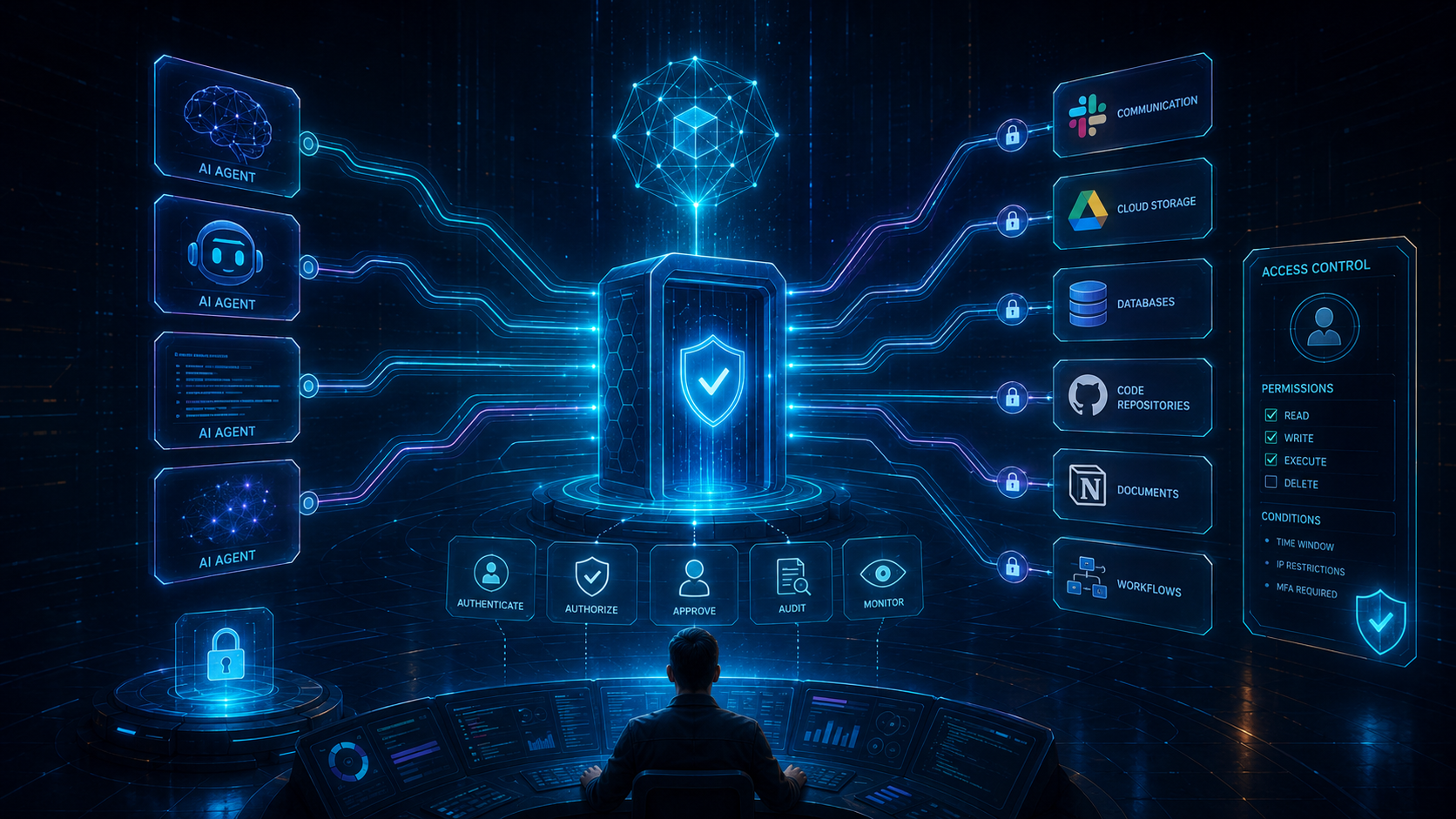
If you keep seeing MCP mentioned in AI products, the short answer is simple.
MCP, or Model Context Protocol, is an open standard that lets an AI application connect to outside systems in a consistent way. According to the official MCP introduction, it is a standard for connecting AI applications to data sources, tools, and workflows, much like a common port standard for devices. In practice, that means an AI agent can read context from one system, call a tool in another, and follow a workflow without every vendor inventing a brand-new integration pattern each time.
That matters because the useful version of AI is rarely just a chat box. It is an assistant that can see the right files, query the right system, and take a narrowly authorized action when needed. If you are already thinking about AI stack durability, this is the same broader shift behind The Unlimited AI Subscription Is Dying and AI Provider Risk Is Real: What Fable 5 and GPT-5.6 Mean for Your AI Stack. The quality of the model still matters, but the connection layer increasingly matters too.
Quick answer
MCP is not a model, and it is not a replacement for APIs or RAG.
It is a connection standard.
It gives AI clients a structured way to discover and use three main server-side primitives defined in the MCP specification:
- Prompts, which are predefined templates or instructions
- Resources, which are structured context or content
- Tools, which are executable functions that let the model take action
That structure is the important part.
Without MCP, every AI app that wants access to your calendar, CRM, docs, codebase, or internal workflows has to build a custom integration path. With MCP, the host app, connector layer, and server can speak a shared protocol instead.
What is MCP, in plain English?
The easiest way to think about MCP is this:
An API gives one system a way to talk to another system.
MCP gives an AI client a standard way to discover what context exists, what tools are available, and how to use them safely enough to be useful inside an agent workflow.
That is why people compare it to USB-C for AI.
The official specification says MCP uses JSON-RPC 2.0 messages and defines communication between hosts, clients, and servers. The host is the AI application itself. The client is the connector inside that host. The server exposes capabilities the host can use.
If you only remember one line, remember this one:
MCP is the standardized bridge between an AI application and the outside systems it may read from or act on.
How MCP works
Here is the basic flow in practice:
- 1A host AI application, such as an assistant, IDE, or agent workspace, opens an MCP connection.
- 2Its MCP client discovers what a connected MCP server offers.
- 3The server exposes prompts, resources, tools, or some combination of the three.
- 4The user or host decides what should be accessible.
- 5The model can then use those exposed capabilities inside the task it is trying to complete.
That can look very small:
- Read one file
- Search one database
- Run one calculator-style tool
Or much broader:
- Read a design file
- inspect a codebase
- call a deployment tool
- update a task in another system
The protocol does not guarantee that those actions are safe.
It guarantees there is a shared way to represent them.
MCP client vs server
This is one of the most common points of confusion.
| Component | What it is | What it usually does |
|---|---|---|
| Host | The AI application or environment | Runs the conversation and owns the user experience |
| MCP client | The connector inside the host | Connects to MCP servers and negotiates available capabilities |
| MCP server | The external service exposing capabilities | Offers prompts, resources, and tools to the client |
So when someone asks, "what is an MCP server?", the practical answer is:
It is the service that exposes something useful to the AI.
That "something useful" might be:
- access to local files
- a bridge to a SaaS app
- a database query tool
- a workflow trigger
- internal documentation
- reusable prompt templates
The server is not the same thing as the model. It is the capability surface around the model.
Prompts, resources, and tools are not the same
The MCP specification draws an important distinction between the three core primitives.
| Primitive | Who mainly controls it | What it is for | Example |
|---|---|---|---|
| Prompts | User-controlled | Guided templates and reusable instructions | A slash command for writing a launch brief |
| Resources | Application-controlled | Context attached for the model to read | File contents, docs, records, or git history |
| Tools | Model-controlled | Executable actions | Search, create record, write file, send request |
This matters because permissions should not be treated as one giant yes-or-no switch.
Reading a document is not the same thing as writing to a production system.
Seeing a prompt template is not the same thing as executing a tool.
The more an MCP client exposes those distinctions clearly, the safer the setup usually is.
What can an AI agent access through MCP?
Potentially, a lot.
The official introduction describes MCP as a way for AI applications to connect to data sources, tools, and workflows. That can include local files, databases, search tools, specialized prompts, and external applications.
In practical terms, an MCP-connected agent may be able to access:
- files and folders you approve
- internal docs or knowledge bases
- project-management records
- CRM data
- code repositories
- deployment and automation tools
- browser or research tools
- app-specific actions such as creating, updating, or deleting records
The important word is "may."
MCP does not automatically grant universal access. The real access boundary depends on the host, the server configuration, the transport, the authentication model, and the permissions the user approves.
That is why "what can it access?" should always be followed by "what exactly did we connect, and with what scope?"
Local vs remote MCP server
There is a big operational difference between a local MCP server and a remote MCP server.
Local MCP server
A local MCP server runs on the user's own machine.
That can be useful when the AI needs access to local files, local developer tools, or software installed on the device. It can also be riskier than it sounds. The MCP security best-practices documentation warns that local MCP servers can have direct access to the user's system and that one-click setup flows must show the exact command being executed and require explicit user approval.
The practical risk is straightforward:
If you install or launch an untrusted local server, you may be running code on your own machine with your own privileges.
Remote MCP server
A remote MCP server runs elsewhere and the client connects over the network.
That often makes sense for SaaS apps, shared business systems, and centrally managed integrations. OpenAI's ChatGPT developer mode documentation says remote MCP apps support streaming HTTP and SSE, with authentication options including OAuth, no authentication, and mixed authentication depending on the configuration.
Remote does not mean risk-free.
It means the risks shift more toward:
- authentication design
- overbroad scopes
- data exfiltration
- prompt injection through connected tools or content
- weak authorization boundaries
Local vs remote is therefore not "unsafe vs safe."
It is "different trust and permission problems."
Is MCP safe?
MCP can be safe enough for real use, but only if you treat it as a permissions and trust problem, not as a magic convenience layer.
The stable MCP specification explicitly warns that the protocol enables arbitrary data access and code execution paths. It says users must explicitly consent to data access and tool use, and that implementors should build robust authorization flows, clear documentation, and appropriate controls.
That is the heart of it.
MCP is powerful because it can connect an AI to useful systems.
It is dangerous for exactly the same reason.
The main MCP security questions to ask before connecting anything
If you are deciding whether an MCP server is safe, these are the questions that matter most:
1. What data can this server expose?
Ask exactly what resources are available and whether the scope is narrow or broad.
A server that can read one project folder is different from a server that can traverse your home directory.
2. What tools can it execute?
Treat tool access as action access.
If a tool can write files, update records, trigger workflows, or call external services, that should be reviewed like any other production capability.
3. How does authentication work?
Remote MCP servers may rely on OAuth or other authentication methods. The MCP security guidance spends substantial time on OAuth-related risks, including consent bypass, state validation, SSRF, and malicious authorization URLs. That is a strong signal that authentication details are not a side issue. They are part of the attack surface.
4. What does the user have to approve?
The specification is clear that users should explicitly consent to data access and tool invocation. If the host makes those choices opaque, the setup is harder to trust.
5. Is the server local, and if so, what exact command starts it?
The security guidance says one-click local configuration should show the full command without truncation and warn clearly that code will be executed on the user's system.
That is not a cosmetic UX choice. It is a core safeguard.
6. What happens if the model is wrong?
Even a legitimate MCP integration can become risky if the model uses the wrong tool, chooses the wrong parameters, or follows malicious instructions from connected content.
Model mistakes plus write access can become real operational damage quickly.
MCP vs API
MCP and APIs overlap, but they are not the same thing.
| Question | API | MCP |
|---|---|---|
| Who is it mainly designed for? | Software talking to software | AI hosts and agent workflows discovering context and actions |
| What does it expose? | Endpoints and operations | Prompts, resources, tools, and protocol-level capability negotiation |
| Does it replace the other one? | No | No |
In many real systems, the MCP server is simply wrapping one or more APIs and presenting them in a format an AI client can use more naturally.
That is why "MCP vs API" is not really a winner-takes-all question.
An API is often the underlying capability.
MCP is the standard interface layer that makes that capability easier for AI applications to consume consistently.
MCP vs RAG
MCP also gets confused with RAG, but they solve different problems.
| If your main problem is... | RAG helps by... | MCP helps by... |
|---|---|---|
| The model needs better information to answer a question | retrieving relevant content into context | connecting the AI to resources or tools that provide that context |
| The model needs to take an action | not the main job | exposing callable tools and workflows |
| The model needs a standard integration surface across many systems | not the main job | providing a common protocol |
RAG is mainly about retrieval.
MCP is about connection and capability exposure.
They can absolutely work together.
For example, an MCP server might expose a retrieval system as a resource or tool. In that case, RAG is part of the system, and MCP is part of how the AI client reaches it.
Why MCP matters for AI strategy, not just developer plumbing
This is bigger than implementation detail.
If MCP becomes a durable connection layer, it changes how teams think about AI stack design.
Instead of asking whether one AI vendor has every integration you need, you can start asking whether your important systems are available through a standard connection model that more than one host can use.
That has strategic upside:
- less one-off integration work
- more portable agent workflows
- easier experimentation across hosts
- a cleaner path from chat assistant to operational agent
It also creates a new review surface.
If an MCP server becomes the bridge to your workflows, that bridge deserves real governance.
This is one reason specialized tools and stack visibility matter more as AI matures. If you want the broader business version of that argument, Beyond ChatGPT: Why Specialized AI Tools Often Win for Real-World Tasks and The Choosely Stack: How Solo Founders Replace a Whole Team with AI in 2026 are the most relevant companion reads.
A practical framework before you connect any MCP server
Use this checklist before enabling one:
- 1Identify whether the server is local or remote.
- 2List the exact resources it can expose.
- 3List the exact tools it can execute.
- 4Confirm what authentication and consent flow the host uses.
- 5Limit access to the smallest scope that still gets the job done.
- 6Prefer read-only access first, then expand only if the workflow genuinely needs write actions.
- 7Test with low-risk data before connecting anything sensitive.
- 8Review logs, prompts, and outputs for signs of tool misuse or overreach.
MCP adoption is moving quickly. Anthropic's December 9, 2025 announcement about donating MCP to the Agentic AI Foundation under the Linux Foundation described the protocol as having broad ecosystem adoption and formal support from multiple major AI and infrastructure companies. That is good for standardization.
It is not a reason to skip review.
Final takeaway
If you want the simplest possible answer to "what is MCP?", here it is:
MCP is the standard connection layer that helps AI agents discover and use external context, tools, and workflows.
If you want the next answer, it is this:
The important question is not just what MCP is, but what a particular MCP connection allows an AI to read or do once it is enabled.
That is the real decision boundary.
FAQ
What is MCP?
MCP stands for Model Context Protocol. It is an open standard for connecting AI applications to external systems such as data sources, tools, and workflows.
What is an MCP server?
An MCP server is the service that exposes useful capabilities to an AI client, such as prompts, resources, or tools.
MCP client vs server: what is the difference?
The client lives inside the AI host and connects outward. The server provides the capabilities the host can use.
Is MCP safe?
It can be safe enough for real use, but only if permissions, authentication, consent, and tool scope are handled carefully. MCP increases capability, which also increases the importance of trust boundaries.
Does MCP replace APIs?
No. APIs still provide underlying system functionality. MCP often sits on top of APIs as a standardized way for AI clients to discover and use that functionality.
Does MCP replace RAG?
No. RAG helps a model retrieve relevant information. MCP helps an AI host connect to systems that may provide information or actions. They are complementary, not substitutes.
Primary sources
- Model Context Protocol: What is MCP?
- Model Context Protocol stable specification
- Model Context Protocol server primitives
- Model Context Protocol security best practices
- Anthropic: Introducing the Model Context Protocol
- Anthropic: Donating MCP and establishing the Agentic AI Foundation
- OpenAI: ChatGPT Developer Mode and MCP support
Related reads
The Change Brief
Get the week’s AI changes in one clear read
Pricing moves, tool launches, free-tier changes and practical stack updates, filtered for people who actually use these tools.
Stay ahead of AI without following it all day. We’ll send you what matters each week.
Continue reading
Related reads
Product Update
Does ChatGPT Watermark Text? OpenAI's textGrain Marks Explained
OpenAI is introducing textGrain watermarks to eligible ChatGPT and Codex text in the EU while API customers can opt in globally, but detection remains limited and is not proof of authorship.
AI Strategy
Can You Use ChatGPT Plus in Other Apps? Sign in with ChatGPT Explained
Plus and Pro users can use eligible ChatGPT plan allowance inside participating apps, while partner plans, unsupported features and fallback charges remain separate.