 CHOOSELY

Getting an AI image you like is one thing. Asking for a small revision without disturbing everything you liked about it is where the negotiation begins.
Change the car's color, keep the scene. Change the coat, keep the car. Make one last adjustment, then discover that the last adjustment needs adjusting.
Seedream 5.5 is aimed at that finishing work. ByteDance's image-generation and editing model puts controlled revisions and transparent assets at the center of its pitch. The practical attraction is keeping a useful image useful as the brief changes.
We tried it through Higgsfield, starting with a rain-soaked getaway scene: a red sports coupe, a racer in a blue coat and a robotic panther. Two successive edits changed the car and then the coat while carrying the composition forward. A separate glass test showed where finishing work remained.
Why the editing promise matters
ByteDance announced Seedream 5.5 on November 9. It says targeted training helps the model preserve unedited regions at pixel level, and demonstrates 100 successive edits, each starting from the previous result. It also claims more natural textures and more accurate text rendering. Those are company claims, distinct from our small test.
For a designer, the important part is what survives a revision. If a product's shape, label or lighting changes unexpectedly, someone has to restore it, approve the difference or start again.
The official gallery illustrates rooms revised across several steps and changes to portrait and product details. Developing one composition through revisions is the useful promise. A hundred trouble-free edits on your own project remain unproven by our example.
One scene, two successive edits
Our starting brief was deliberately cinematic: a cherry-red sports coupe on a wet industrial street, a black-chrome robotic panther on its roof and a racer in a cobalt coat. Amber light, steam and cool shadows gave it the atmosphere of a film still.
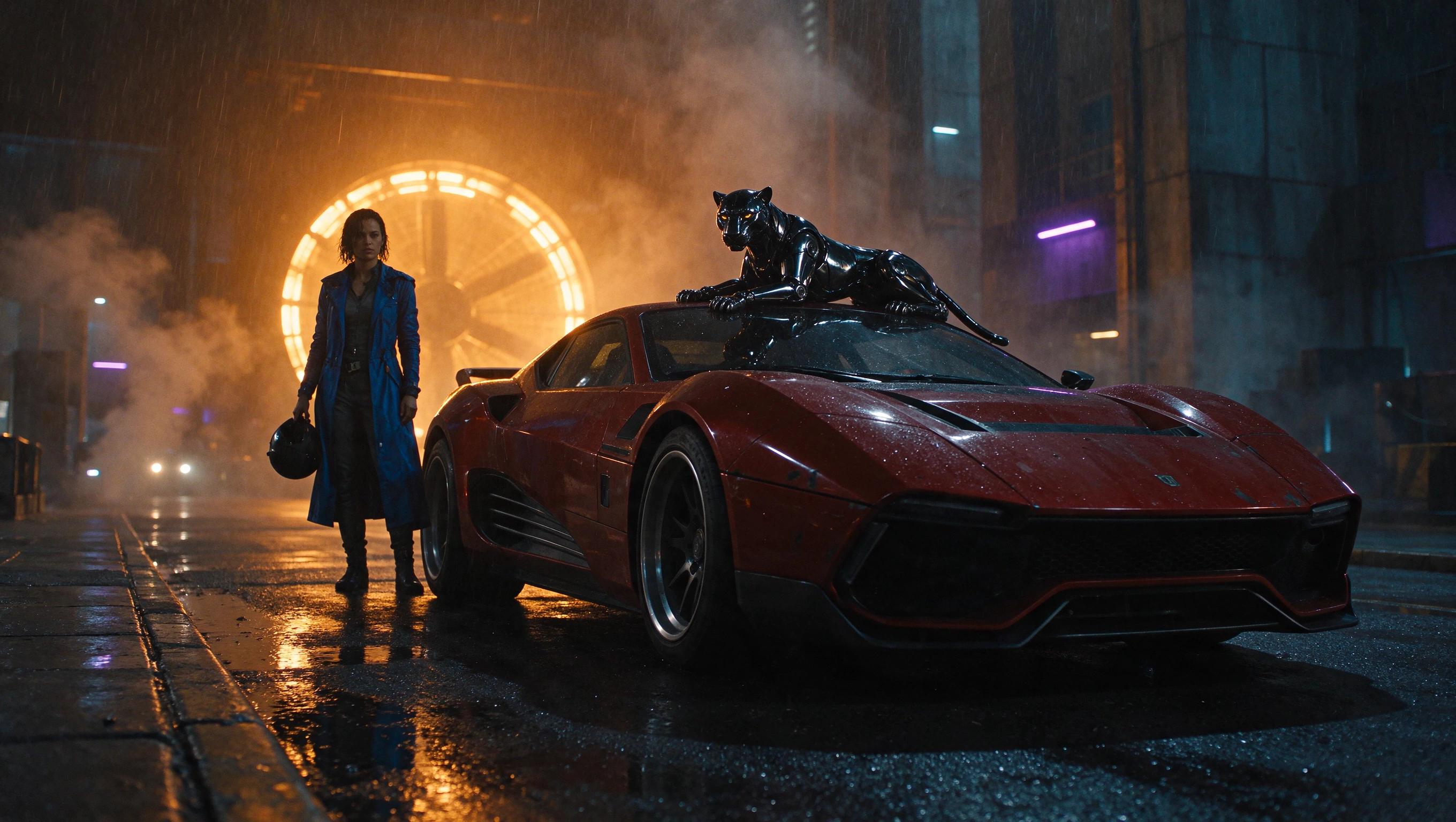
First, we fed that image back into Seedream 5.5 and asked it to change only the car's red painted panels to acid-yellow metallic paint. We allowed corresponding color reflections immediately beneath the car and asked it to preserve the other scene details.
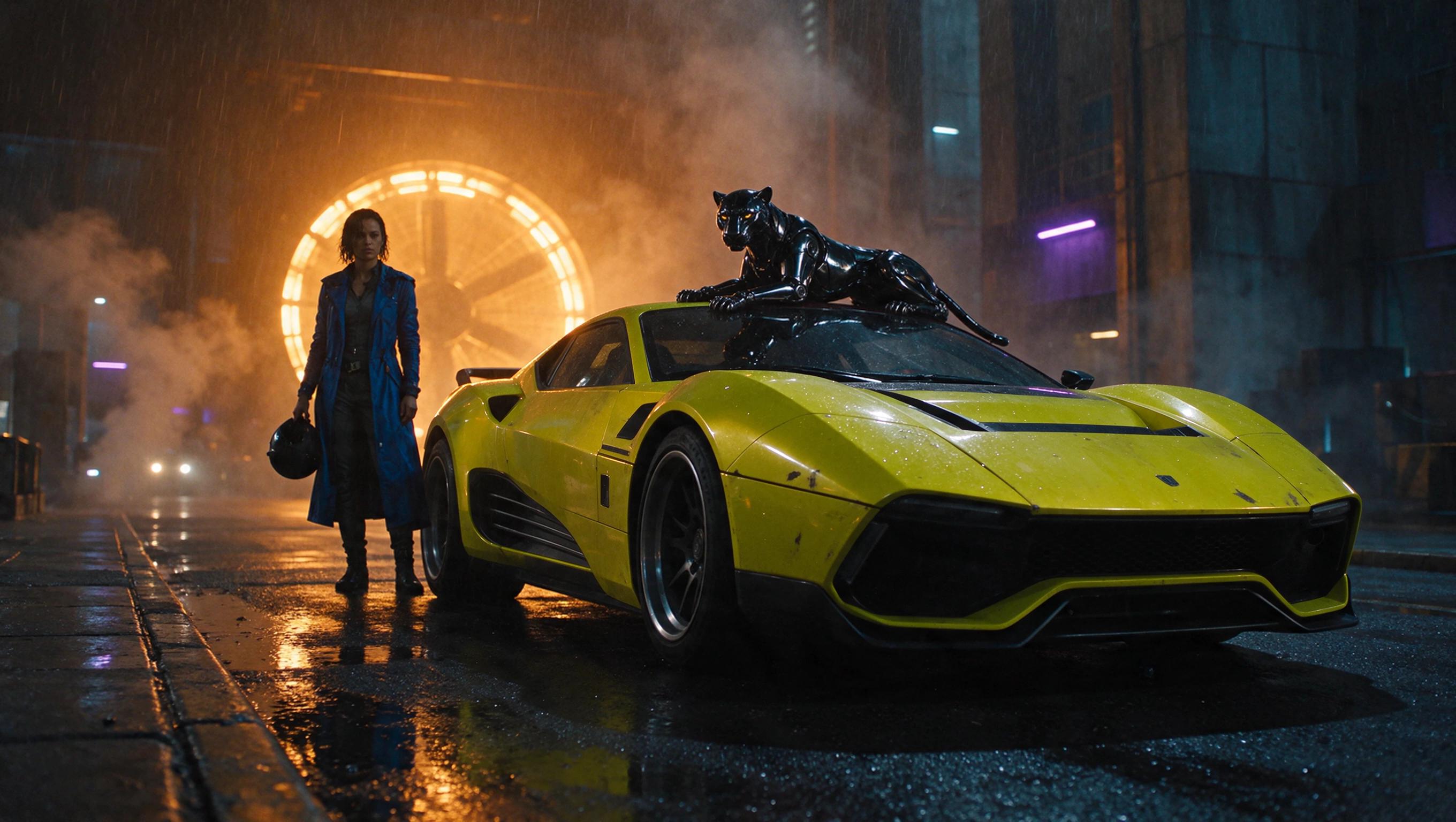
Next, we used that yellow-car result as the input and asked for only the cobalt coat to become metallic silver, retaining its cut and the surrounding scene.

Both requested changes are clear, and the composition stays visually consistent across the sequence. The racer holds the same pose and helmet; the panther remains on the roof beneath the amber light. That is a useful demonstration of revising a selected scene instead of starting again.
It is not pixel-identical preservation. Close inspection shows fine details and textures shifting or softening, including on the racer and panther. Delivered pixels also differ in a background region above the edited objects. These two edits support a limited observation of visual continuity, not ByteDance's 100-round claim or a guarantee for critical labels and faces.
Transparency is a separate test
Seedream 5.5 also supports native RGBA output, according to its model page. The alpha channel describes which pixels are opaque, transparent or somewhere between, allowing an asset to move into another layout without a rectangular backdrop.
Clear glass is harder than an empty background. A shiny object can look translucent while its file contains an opaque picture of glass. A transparent PNG is also still a raster image, rather than an editable vector or design document.
In our earlier glass-hummingbird exercise, the first output retained a dark rounded backdrop despite transparent mode. We fed that result back into the same model and asked it to remove the remaining backdrop, keep the subject and its glass details, and make the clear wings genuinely see-through.
The follow-up delivered a real alpha cutout that could sit on light and dark backgrounds. The broad glass surfaces remained largely opaque, although both prompts asked for see-through wings. The stem and lower leaves also ended flat at the frame's bottom edge, limiting some layouts.
That matches an earlier independent test by Quantslant, which got genuine alpha through WaveSpeedAI but none of its three glass objects let the background show through. Our exercise adds another provider route and inspectable files, rather than a new discovery about glass.
How we made the examples: We used Seedream 5.5 through Higgsfield's MCP connection, which deducts credits. The cinematic original and two successive edits used the 2K setting and returned 2720 × 1536 RGB PNGs. Each cost 3.5 credits: 10.5 for the three-frame sequence. The separate two-output glass exercise cost 7 credits, bringing all article testing to 17.5 credits. No retries, upscales or manual retouching were used on the cinematic sequence.
Higgsfield lists the model as Unlimited-eligible; we did not verify a qualifying website entitlement or test that route. Its Unlimited documentation explains why the route matters.
Where you can try Seedream 5.5
Access belongs to the provider and account as well as the model name.
| Route | What we verified | What to check before starting |
|---|---|---|
| Higgsfield | Seedream 5.5 completed all five requests in our account. The route exposed transparent PNG output, reference images and 1K, 1.5K and 2K settings. | Whether your plan and route charge credits or qualify for Unlimited. Our charges came through MCP. |
| Dreamina | Its published instructions name “Image 5.5 by Seedream 5.5.” | Access, controls, export options and generation costs are account-dependent. We did not generate there. |
| BytePlus | Its product page advertises 5.5 alongside new-user promotional pricing. | We could not establish a standard 5.5 API rate or callable model ID from the retrieved pricing table. Check the current account quote. |
The Chinese announcement describes a progressive rollout across Jimeng, Doubao, Doubao Work and Volcano Engine Ark. It does not establish identical access in every country or account.
If you already pay for Higgsfield, check what your current plan covers before buying anything new. Our platform explainer covers why its routes bill differently.
Choosely’s verdict
Seedream 5.5 has a sensible target: the revisions and reusable assets that turn an interesting generation into something someone can finish.
Our cinematic sequence shows the appeal. We changed two visible parts of a striking scene, one after the other, while keeping its composition recognizable. The glass exercise supplies the counterweight: a real cutout can still contain unconvincing glass.
For an existing user, a small trial on an asset you need is worthwhile. Check the details that must survive, inspect the export and judge how much repair the result needs. The useful breakthrough will be fewer rounds of fixing the final deliverable.
The Change Brief
Get the week’s AI changes in one clear read
Pricing moves, tool launches, free-tier changes and practical stack updates, filtered for people who actually use these tools.
Stay ahead of AI without following it all day. We’ll send you what matters each week.
Continue reading
Related reads
AI Tool Recommendations
What Is Higgsfield AI? Why It’s Everywhere and What You’re Paying For
Higgsfield combines its own AI, third-party models and creative-production workflows. The buying question is whether that production layer saves enough work to justify another platform.
AI Tool Recommendations
Best AI Image Generator in 2026: Match the Tool to the Job
There is no universal best AI image generator. These five specialist picks match product shots, infographics, artistic direction, local deployment and vector work.
Product Update
ChatGPT Images 2.6 Brings GIFs Into the Conversation
OpenAI confirms Images 2.6 across ChatGPT and Codex plans and in the API. Explore GIF creation, reported editing controls and the limits our account check leaves open.